


This is the first in what we’re planning to be an ongoing series on incident handling. We’ll be breaking down real incidents and showing how our people, platform, and processes combine to resolve network and infrastructure issues.
Early one morning, a network that supports a group of 911 call centers started throwing alarms. By the time the ticket opened, 41 had arrived to the NOC from 12 different devices.
The call center in question never went down. It has two network paths, and only one had failed. But a single remaining path is a delicate operating surface for a 911 center, and in this case, the failure was on fiber running through rural country, where plenty can go wrong and a crew has to physically drive out to fix it.
It took about five hours to get the circuit back. The cause was a lightning strike.
Eric Idler, who runs INOC’s Shared NOC as Sr. Director of NOC Operations at Xerox IT Solutions, walked us through the ticket. While it’s not a particularly “dramatic” incident story, it’s an instructive look at what the NOC did to keep a carrier moving and a critical infrastructure client informed.
While lightning strikes are certainly not common, most incidents look a lot like this, which is why we’re breaking this one down. It shows clearly where the platform does the work and where people do.
The incident lifecycle at a glance
Environment: Network connectivity for a group of 911 call centers in a rural area, built on aerial fiber with some microwave links and meshed so nearly every connection has a backup path
What failed: One of two fiber circuits serving a 911 call center
Impact at the call center: None, traffic rerouted to the backup path.
Alarms: 41 from 12 devices when the ticket opened, 56 over the life of the incident, all on one ticket
Cause: A lightning strike. The carrier’s crew re-seated the fiber at the call center end.
Time to restore: About five hours from ticket open
Handled by: Tier 1, start to finish
Closed: Automatically, after 24 hours with no alarms
The network
Again, the client supports the network connections for those 911 call centers. It’s not technically an ISP, but its job is keeping the links into the call centers up, and those links run through a rural area on fiber strung from poles with some microwave in the mix.
Aerial fiber and microwave links tend to invite incidents sometimes due to more unusual causes. Given the service criticality this network, it’s built so a single failure doesn’t take the service offline. It’s more of a web than a ring, with routing protocols keeping a backup path ready for almost every connection. When one link breaks, devices across the network notice, report it, and move traffic around it.
That’s good network/ITOps design, but it also means one broken circuit produces a lot of alarms at times. Most of those alarms are noise in the sense that the alarms are saying something happened within the network, and it identified that and did some automatic traffic rerouting to make sure everything stayed online.
Three seconds into the incident
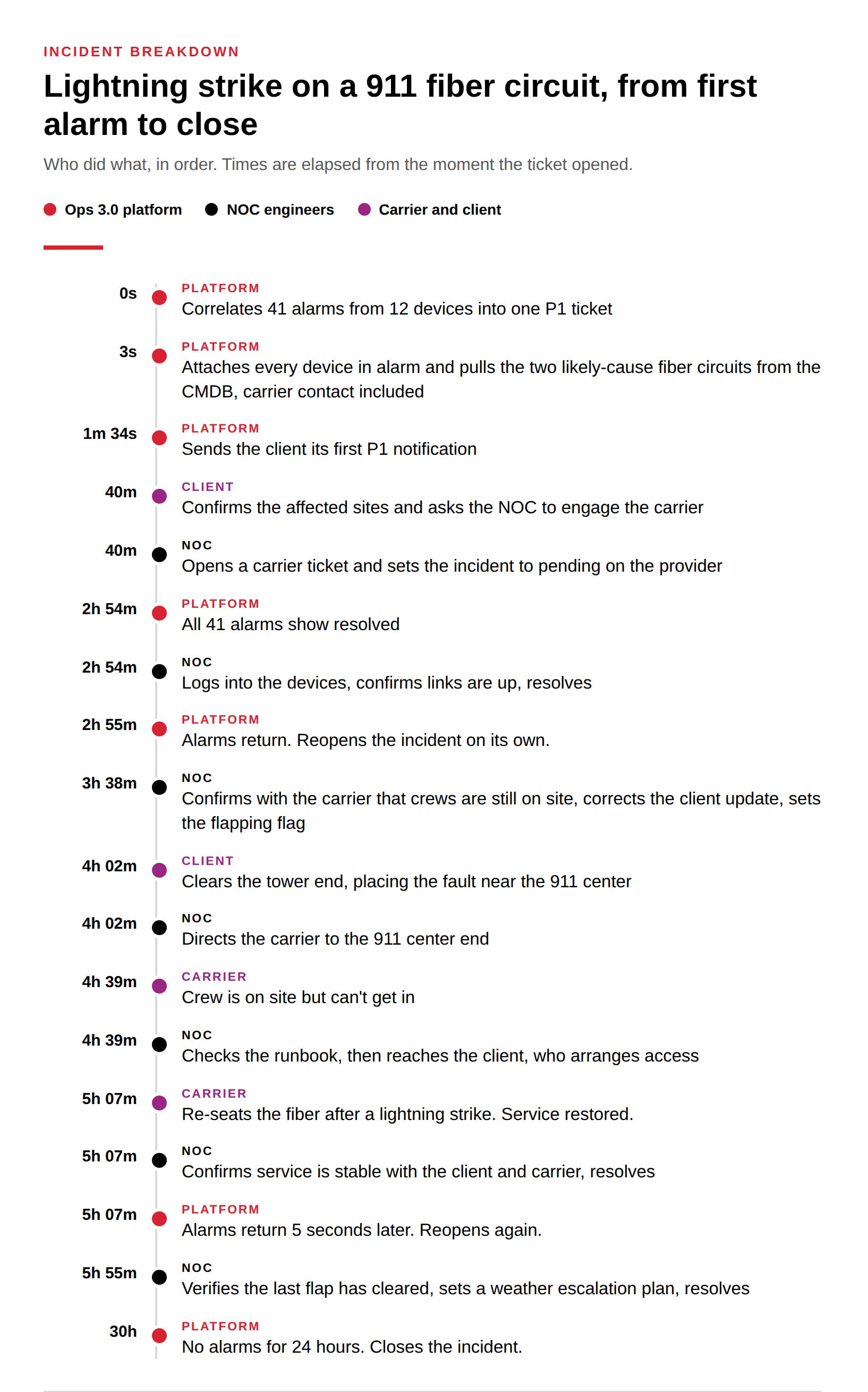
The alarms in this incident came from 12 devices: port alarms, label-switched paths going down, routing sessions dropping. The correlation engine in our Ops 3.0 platform grouped all 41 into a single ticket and opened it as a P1 (a priority 1 or our highest priority incident classification).
If you’re not already familiar with how Ops. 3.0 works, here’s a quick overview of it and our intro:
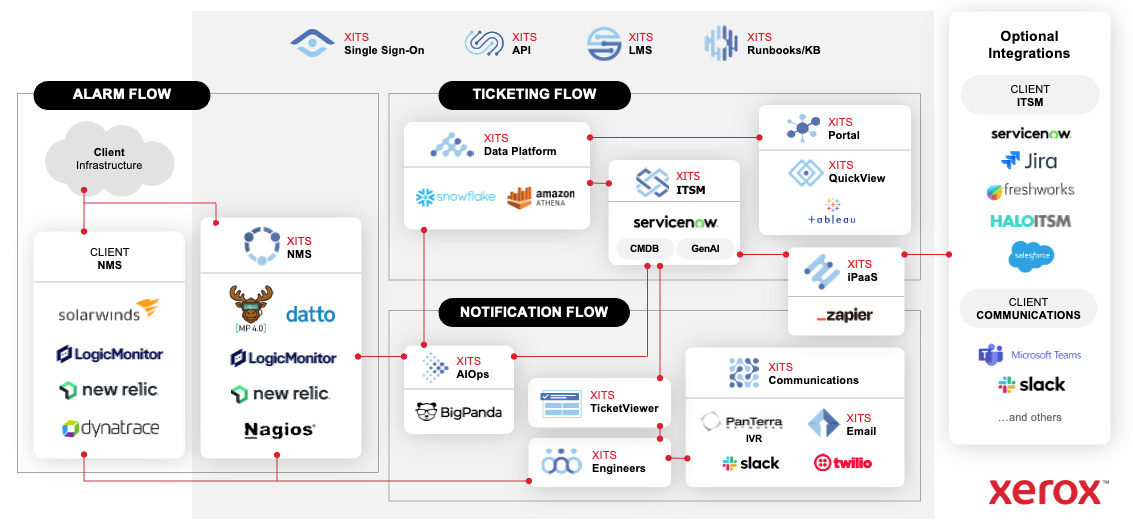
Then it did the work that usually fills an engineer’s first stretch of an incident. Two seconds after the ticket opened, every device and interface in alarm was attached to it. One second after that, the platform went to the service records in the CMDB and attached the two fiber circuits most likely to be the cause.
Let’s pause there: the ticket at this point was three seconds old, and nobody had touched it yet.
Eric described what an engineer would be doing without that tooling doing the upfront work:
“If you’re a human being doing this, you’re saying, I have all of these different devices in alarm. I’m probably going to key on a couple of specific alarms, like a loss of signal, and then I’m probably validating on a network diagram that your hunch is correct.”
The two circuit records also carried the carrier’s NOC contact information. Whoever picked up the ticket could see what had probably failed and who to call about it without having to look up either one.
About a minute and a half after the ticket opened, the platform sent the client its first P1 notification. From then on, the client got an email at each stage of the incident, with its current status right in the subject line.
Getting the carrier moving
Within the first hour, the client’s team called the NOC (us).
They confirmed the outage was between two specific sites and asked the NOC to get the carrier working on it. An engineer called the carrier, opened a ticket, set the incident to pending with the provider, and noted that the NOC would continue to follow up for updates.
From there, the fix was in the carrier’s hands.
A crew had to drive out, find the fault, and repair it, and nothing in a NOC makes a truck drive faster. The NOC’s job in an incident like this is to keep the carrier accountable, keep information flowing between the carrier and the client, and keep monitoring the network the whole time.
Reading the alarm feed back in the NOC
While the crew worked on site, the correlation engine within our NOC posted a running summary to the ticket every time an alarm changed state: how many alarms were high, medium, or low severity, and how many had resolved.
For close to three hours, the resolved count bounced between 14 and 15. Something on the network was flapping, firing, and clearing so quickly that the platform registered it, but by the time the workflow updated the ticket, the alarm had usually cleared again.
Then the count jumped. All 41 alarms showed resolved.
Eric’s team reads a jump like that as a sign that someone is out on the line working (but of course, you can’t take that as proof).
“That can be a hunch of ours, that someone is out there doing something. But we don’t assume that. We need that confirmation.”
The all-clear that wasn’t quite
An engineer logged into the devices, confirmed the links and routing sessions were up, and resolved the ticket.
But less than a minute later, alarms came back. Our NOC platform reopened the incident on its own, flagged that its alarms had returned, and put it back in front of the NOC to reinvestigate.
The carrier’s confirmation of its own ticket arrived by email shortly after, and a call to the carrier confirmed its crews were still on site working to restore service. The engineer moved the incident back to pending on the provider and sent the client a correction to the earlier update.
The engineer also set the incident’s flapping flag. That keeps the stream of automated alarm updates out of the work notes while a known flap is in progress, so anyone reading the ticket sees the engineers’ updates instead of a long run of state changes.
Alarms clearing doesn’t mean the problem is fixed, and our platform doesn’t let a ticket stay resolved on the strength of one clear!
Narrowing down the cause
About four hours in, the client called in confirming the tower end of the circuit was clean, which put the fault near the 911 center. They asked the NOC to send the carrier to that end, and the engineer on the ticket called the carrier and passed it along.
About 40 minutes later, the carrier called back. The crew was at the call center site and couldn’t get in. The engineer checked the runbook for a site access procedure, found none for that location, and called the client contact, who said a colleague was already working with the carrier to get the crew in.
About five hours after the ticket opened, the client called to say the work was done on site. They reported a lightning strike at the tower that appeared to have hit the circuit, and the crew had re-seated the fiber at the call center end.
Service was back.
The carrier called right after to check whether service had been restored, and the engineer confirmed it was up and stable.
Based on the reported fix, it’s likely that they pulled the fiber to run an OTDR test, found a burnt connector tip or a burnt pluggable optic, and re-terminated it. An easy fix at the end of the day, caused by a force of nature.
Closing it out
The engineer resolved the ticket. Five seconds later, alarms came back and the platform reopened it again. (We put that down to residual flapping while the carrier’s crew wrapped up.)
Shortly after that, another engineer picked up a final link flap on one interface. They logged into the node, confirmed the link had restored, and wrote down the plan. The client had confirmed the work was complete, so crews should be hands-off, and if another flap appeared, the NOC would go back to the client to check whether bad weather was causing ongoing trouble.
None appeared! We held the ticket for 24 hours of monitoring, and when no alarms came back, our platform closed it automatically.
The incident went into the record with a resolution category, which allows it to show up correctly in the client’s reporting on the causes of their outages.
By the numbers
About 5 hours from ticket open to restored service
About 30 hours from ticket open to close, including the 24-hour hold
3 seconds for the platform to attach the devices in alarm and identify the two likely-cause circuits
56 alarms over the life of the incident, all on one ticket
2 automatic reopens when alarms returned after a resolution
4 engineers on the ticket, with about 2 hours and 19 minutes of logged work
0 escalations past Tier 1
Most of those 30 hours were spent waiting on a crew and then watching for a recurrence. The engineering time went to calls, checks, and updates.
What this incident shows
The first minutes of an incident are where an under-equipped NOC falls down the most time. An engineer looking at 41 alarms has to determine which ones matter, trace them on a diagram, locate the circuit, and then find out who to call.
Here, as with so many of the incidents that we manage, our platform had done all of that within three seconds of the ticket opening.
The platform also didn’t trust a clear. Twice, alarms returned after the ticket was resolved, and both times the incident went straight back into the NOC’s queue without anyone having to notice.
And the process held across four people. Every call, every carrier conversation, and the one correction went into the ticket, so each engineer picked up where the last one left off. The whole incident stayed at Tier 1, which is where a carrier-driven outage like this belongs. Senior engineers never had to be pulled in.
What we’re testing right now
While it wasn’t employed in this incident, we’re currently developing and testing an AI-powered triage agent that provides even more context and direction at machine speed.
When a ticket opens, the agent takes a first pass at triaging the way an engineer would. It reads the alarms, the CMDB data, any recent changes, and past tickets on the same equipment, then drafts a likely root cause and a step-by-step action plan.
For now, every output goes to our Advanced Incident Management team, and they only use it after checking that it holds up. Longer term, the goal is for the agent to rate how confident it is, so its strongest calls go straight into the ticket and engineers spend their time checking the work instead of starting from scratch.
We’re also starting to work with carriers on getting access to their ticketing systems. That would let the platform open a carrier ticket on its own when the alarms point to a carrier fault.
If the first hour of an incident in your NOC still looks like an engineer staring at 10+ alarms and a network diagram, get in touch. We’d love to show you how our operation modernizes monitoring and management.
For more on the platform behind this ticket, read A Brief Introduction to INOC’s Ops 3.0 Platform.

About INOC, a service of Xerox IT Solutions
INOC is an ISO 27001:2022 certified 24×7 NOC and an award-winning global provider of NOC Lifecycle Solutions®, including NOC support, optimization, design, and build services for enterprises, communications service providers, and OEMs. INOC solutions significantly improve the support provided to partners’ and clients’ customers and end users.
INOC assesses internal NOC operations to improve efficiency and shorten response times, and provides best practices consulting to optimize, design, and build NOC operations, frameworks, and procedures. Proactive 24×7 NOC support is provided with several options, including North America, EU, or APAC only or global integrated NOCs. INOC’s 24×7 staff provides a hands-on approach to incident resolution for technology infrastructure support.
Learn more about our NOC support and NOC operations consulting services. Get in touch to start the conversation. We’d love to talk NOC.