


Gartner (now infamously) reported back in 2019 that only about 25% of organizations investing in a CMDB felt they were getting meaningful value out of it. That number gets quoted a lot, usually as evidence that CMDBs are a lot of work for not much return.
We’d put it differently. Most of what gets called a CMDB is actually just an asset inventory with a more impressive name.
An inventory answers only one question: what do we own? That’s important to answer sometimes. It’s just not the question anyone is asking at 2 a.m. when they’re trying to see which services were affected by an outage.
When an alarm fires, the questions are different.
What service just went down?
Which customers or end-users are affected?
Where is the device physically located?
Who do we call at the carrier?
What are we supposed to do about this step-by-step?
An asset list answers none of those, which is why teams who built one keep finding that it doesn’t do much for them during an incident.
Our own CMDB here at INOC has eight core kinds of data in it. Asset data is one of them.
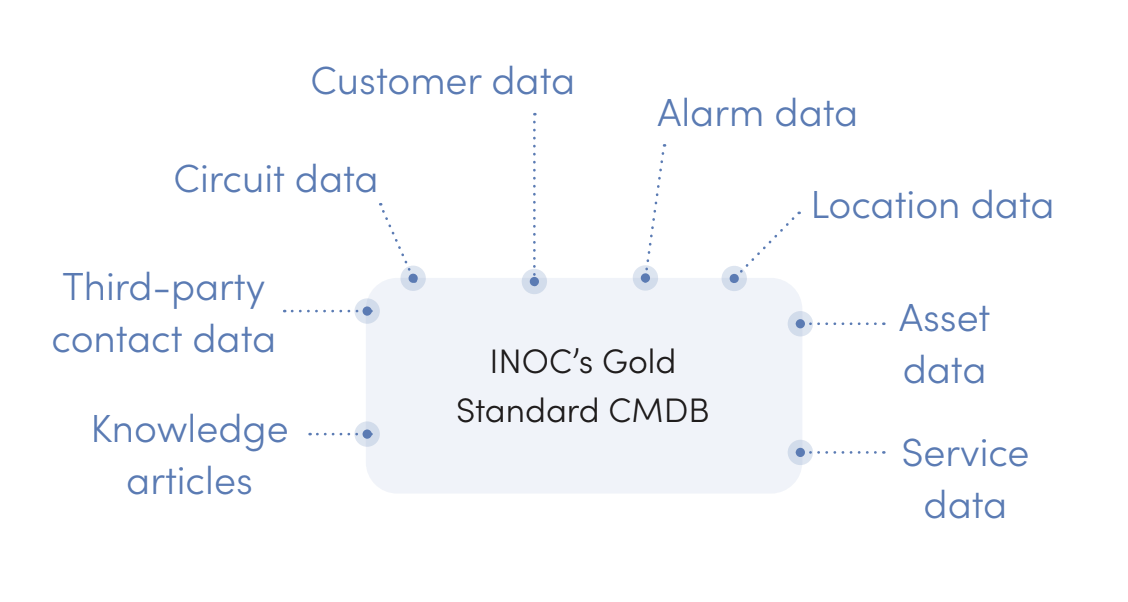
Let’s run through each dimension, because this is what most NOCs should have.
What broke and where that device is located
Asset data is the foundation, and it’s the part most teams already have in some form. Make and model, serial numbers, device type, vendor, platform. The physical and virtual things that generate alarms and need monitoring.
Location data is where it sits. Site name and exact coordinates so it can actually be found.
This sounds trivial until you watch an engineer try to dispatch someone. A technician who can’t tell you which building, which floor, which rack, is a technician who is about to spend twenty minutes on the phone finding out. Every one of those minutes is inside your resolution time.
Circuit data is the layer most inventories skip entirely, and it’s where a lot of resolution time disappears in service provider environments. There are some specific things you need documented here:
Near and far ends of every circuit, so you can establish the specific link and work out what else is affected.
Demarcation data, meaning patch panels, so technicians can trace the correct path.
Circuit ownership, so you know who is responsible for maintaining it.
Carrier IDs and account numbers, because you can’t open a ticket with a provider without them. (Missing or wrong carrier IDs turn into prolonged outages and provider miscommunications more often than anything else on this list.)
Addresses tied to each circuit component.
Who it affects
Here’s where an inventory stops being useful and a CMDB “starts” from a functional standpoint.
Service data covers the things customers actually pay for. That’s usually email, internet access, and LS links. Any services that ride across circuits but aren’t the same thing as circuits.
This distinction has actually become more important over time, not less. Services used to get modeled as circuits. Modeling them as application services instead draws a clear line between physical connectivity and the customer-facing offering, which matters a lot in cloud environments.
A simple example is port going down. Without service data, you just know a port went down. With it, you know which paying services just stopped working, and you can prioritize accordingly.
Customer data closes the loop here. It’s contact information so you can reach the affected parties and they can reach you about things that never triggered an alarm. It’s also any service details, so engineers know what each customer depends on.
One that gets overlooked here is terminology alignment. Clients and customers describe their services in their own words, and those words often aren’t yours. Getting the vocabulary matched in advance prevents a category of confusion that shows up right when nobody has patience for it.
Who you call or otherwise contact
Third-party contact data is the least “glamorous” item on this list but it’s one of the biggest time savers. We attach the correct vendor support numbers, emails, and portal URLs right to the asset record so an engineer opens a case instead of searching for how to open a case. Carrier contacts with the account and circuit identifiers are already alongside them.
What makes this work is being precise about who is who. Field technicians and carriers have different responsibilities, and calling one when you needed the other wastes a cycle. Customers and venues aren’t the same either. A customer may own the service while a venue is accountable for the physical space and hardware. Vendor technicians are a third category again.
Get those distinctions into the data and engineers stop having conversations that were never going to help. Simply putting this into an actual database for reference pays massive dividends in stress and time reduction.
What to do about it
Our knowledge articles live in right inside the CMDB for a reason. They’re what turns a diagnosis into an action, and they’re how a practice that lives in one experienced person’s head becomes something the whole team can execute.
Two rules keep a knowledge base useful rather than overwhelming.
Follow the 80/20 rule. We focus on articles covering roughly 80% of the situations our engineers expect to run into, written to be “usefully generic.” An article on handling a fiber cut should describe a general process that applies to most customers, not one tailored to a specific span or state that make it useless for anything but that specific scenario.
Then document the edge cases separately. Unique customer notification requirements, non-standard procedures, the things that only come up occasionally but come up cold. The balance between general and specific is what keeps the library navigable.
Whatever you add here, it has to be accurate, reachable during an incident without opening four other systems, and reviewed on a schedule. An article that no longer matches the network is worse than no article, because it costs the whole library its credibility.
The piece that makes the rest of it work
Alarm data is the eighth ingredient in the recipe to an effective support-focused CMDB, and it behaves a little differently from the others. We don’t store it as CMDB data. But it has to match the CMDB data, and when it doesn’t, everything downstream breaks in a specific and predictable way.
Here’s the chain within our NOC operation to show how it works:
An alarm comes into the AIOps engine and gets pushed into ServiceNow.
That creates the incident ticket and runs an escalation matching the alarm to a hostname or a specific field. That match is what attaches the CI.
Once the CI is attached, the ticket gets prioritized and the customer notification goes out automatically.
If the alarm doesn’t match the CI, none of that happens.
The ticket gets misprioritized, so a Priority 1 incident sits in the queue looking like a Priority 4. The customer notification never fires. The customer eventually notices the problem themselves and calls to ask about it. The NOC, having no record connecting that call to the alarm, opens a second ticket to investigate.
One naming mismatch, and you’ve produced a delayed high-priority incident, a customer who found out on their own, and duplicate tickets.
This is why CMDB data quality is a major onboarding focus for us, and why we hold clients to change processes that keep it current through the service lifecycle. The service doesn’t work without it, but when it does, it works incredibly well.
Two design decisions that make a huge difference in CMDB design
Federate rather than hoard. A CMDB should give you a centralized view of asset data. That isn’t the same as storing all of it in one place. Pull data from the systems where it already lives and reflect it, rather than creating a second copy that drifts. Ours isn’t a single database at all. It’s an integrated set of tools and data sources presenting one view.
Discover and audit, don’t type. Manual entry, no automation rules, and discovery tools that get run once and forgotten are the three habits that produce an outdated and misleading CMDB. The best ones combine traditional bottom-up discovery, mapping infrastructure and extending out to customer-facing CIs, with event-driven discovery that maps related CIs when a system event triggers it.
There’s a third thing to mention here, too: A lot of CMDBs have no defined objective, no designated owner, and no mechanism for updating when things change. Name the owner. A database nobody is accountable for reverts to fiction on a predictable schedule!
Questions to consider
A few questions that tend to surface the gaps quickly:
Does your staff spend time hunting for vendor, carrier, or provider contact information during incidents?
Can you tell which customer-facing services an alarm affects, or only which device it came from?
Have you had tickets misprioritized or notifications missed because alarm data didn’t match a CI?
Do you audit CMDB accuracy on a schedule, or find out it’s wrong during an outage?
📄 Our free white paper, CMDB Essentials: 8 Elements for the Modern IT Support Operation, breaks down all eight components in full, with self-assessment questions under each one and a general CMDB checklist at the end. It's a deconstruction of our own CMDB, offered as a model you can measure yours against.
If you'd rather have someone look at your environment directly, our NOC Operations Consulting practice assesses support requirements, analyzes gaps, and builds the workflows and operational visibility to close them. Contact us and we'll set up a discovery call.

About INOC, a service of Xerox IT Solutions
INOC is an ISO 27001:2022 certified 24×7 NOC and an award-winning global provider of NOC Lifecycle Solutions®, including NOC support, optimization, design, and build services for enterprises, communications service providers, and OEMs. INOC solutions significantly improve the support provided to partners’ and clients’ customers and end users.
INOC assesses internal NOC operations to improve efficiency and shorten response times, and provides best practices consulting to optimize, design, and build NOC operations, frameworks, and procedures. Proactive 24×7 NOC support is provided with several options, including North America, EU, or APAC only or global integrated NOCs. INOC’s 24×7 staff provides a hands-on approach to incident resolution for technology infrastructure support.
Learn more about our NOC support and NOC operations consulting services. Get in touch to start the conversation. We’d love to talk NOC.
