


Private fiber providers are (and have been) building fast to keep up with demand in the US and elsewhere. These builds get planned in extreme detail, but Day 2 usually gets less thought, especially the monitoring and support operations components, and that’s exactly when the network needs the most thorough eyes and fast support.
Some providers hand that work to their equipment vendor’s monitoring service. Others build their own NOC or bring one in.
Many of the fiber companies we support are somewhere in the middle of an expansion when they come to us, and four problems keep coming up, so we thought we’d share what we’ve been seeing for some time now and our general approach to it from the NOC perspective.
1. Monitoring a network that isn’t finished
This is one of the more common situations we encounter on the fiber side, especially on greenfield builds and expansions.
A company will be deploying 120 sites and 300 devices, and they want everything in monitoring as it comes up. It makes sense to follow the infrascturue closely with monitoring. The catch is that we actually take devices into monitoring faster than they finish building them. So some of what we’re watching is only partly turned up. That can mean alarms are thrown for things that are just pending build-out, and parts of it we can’t support yet or shouldn’t be alarming on at all.
A lot of those same devices are already carrying live customer services, though, and those need eyes on them now.
The old answer was all or nothing. Finish the network, then bring it into monitoring. But that leaves live services unwatched for as long as the build takes.
Here’s how we handle it now:
We document every device as soon as it’s networked, powered, and configured to any degree.
Every service, interface, link, and circuit gets recorded, whatever state it’s in, and each configuration item gets a status: in service, pending activation, or under repair. When something goes live, we update the status. The records are already there, so when an alarm comes in, we can respond right away.
We mark components in service or out of service, and mute alarms on anything that’s offline on purpose. That keeps unnecessary tickets from piling up.
The filtering also got easier over time. On older versions of our NOC platform, partial monitoring had to be set up at the trap handler level, which was tedious work only a few experts could do. In Ops 3.0, monitoring data flows through our AIOps layer, where filtering is much more flexible, so changes don’t have to wait on one person.
None of it works without regular conversation with the client, of course. We need to know what’s getting turned up next and when.
I typically suggest bring monitoring on in phases. Start with the components carrying live services and widen it as more of the network comes up. And give your NOC the network diagrams, BOM files, and signal flow charts before turn-up. If you want monitoring that keeps pace with the build, the NOC needs the full picture of the build.
2. The people building the network are also supporting it
Fast growth means revenue, but it also strains the team if the right operation isn’t in place.
At small and mid-sized fiber companies, the engineers running the expansion are often the same people who’d otherwise be supporting the network. You lose them to the build. They can’t do both, and when they try, support is usually what slips.
The fix is to split the work.
Hand the day-to-day operation to a NOC so your technical team can stay on the build. For our fiber clients, the NOC takes the alarms and handles customer notifications for the production environment.
We work with carriers on fiber repairs, notify customers about longer outages, and work with vendor tech support on hardware problems, start to finish. Your senior engineers finally stop getting pulled into every incident.
The advice here is to treat expansion and daily operations as separate jobs, even if both stay in-house. Document both, so whoever runs operations has what they need and the build team has a record of what’s been done. Make sure your tools, or your NOC, can take on more devices as you grow without a drop in performance.
3. Keeping track of what you have and how it connects
A fiber network has a lot more in it than routers and switches. It has strands, endpoints, cross-connects, and more. A strand connects to an endpoint. The run from that endpoint to the next is part of a larger circuit, and each segment in between can be a circuit of its own. Endpoints may connect into nearby buildings. Customer services ride on specific dark fiber spans, or across more than one path.
Knowing what you own is only half of it. You also need to know how it all connects, because that’s what tells you which customer services an alarm affects. We still see providers, including some global ones, tracking inventory in spreadsheets, which only invites messy data and problems.
Our CMDB models the network from individual fiber strands up through circuits and customer services, and the platform puts that data in front of the engineer on the ticket, so nobody has to dig through multiple sources to find it. The goal is to cut the time it takes to find the fault.

We monitor the full range of alarms, from critical down to informational, and we rely heavily on baselines. Fiber systems are smarter than they used to be, and a change in span loss away from baseline will throw an alarm.
That leads to one of the most common mistakes we see. After a repair, the system has to be re-baselined to its new conditions. A lot of operators skip that step and end up chasing threshold alarms that aren’t real problems.
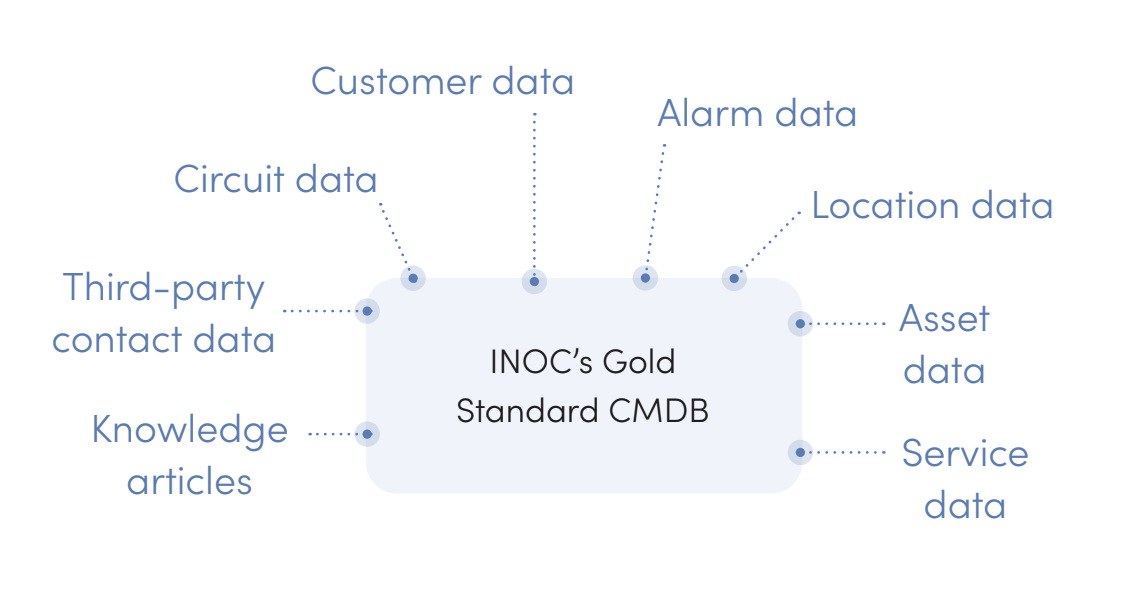
If you’re still recording this in spreadsheets, the first move I suggest is to move into a CMDB that can represent strands, circuits, and services, not only devices. Re-baseline after every repair or significant change. (We help you do just that as a component of our NOC service.)
4. Doing it by hand stops working
Every new asset, connection, and configuration adds data that has to be kept current. Past a certain size, manual updates fall behind, response times stretch, and mistakes creep in.
At INOC, we use API-level integrations to automate the labor-intensive work, like keeping the CMDB in line with the network as it really is.
On the alarm side, Ops 3.0 uses machine learning to correlate alarms into a single incident ticket and attaches the affected configuration items and the right knowledge articles.
It also resolves short-duration incidents automatically, so engineers stay focused on the ones that need them.
If you're not familiar with our Ops 3.0 platform, it’s essentially the operating system for our NOC. It has three major flows: alarm, ticketing, and notification.
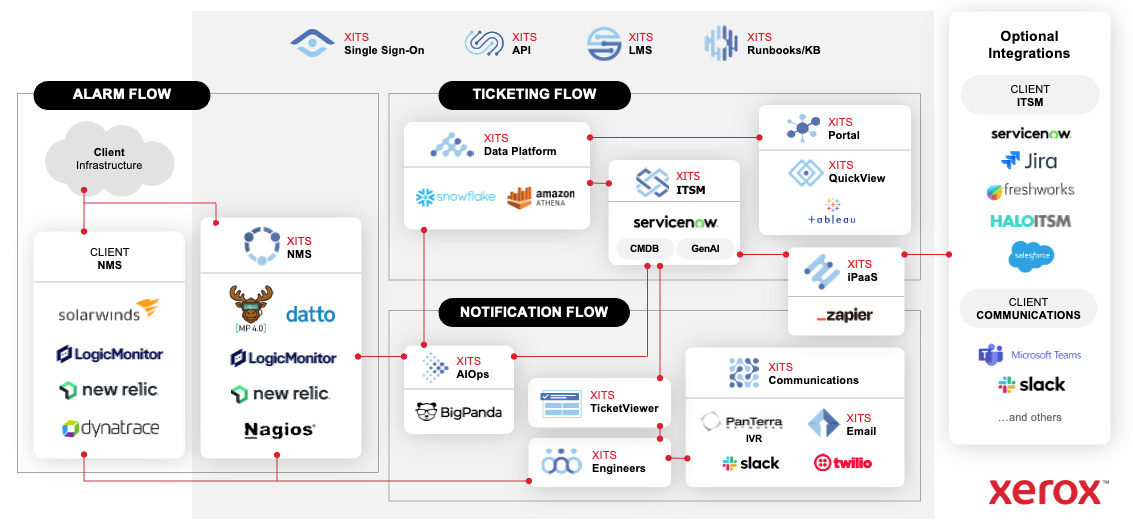
On the left side, client infrastructure and monitoring tools (LogicMonitor, SolarWinds, New Relic, Datto, Nagios, Dynatrace, whatever the client runs) feed alarm and event data into our AIOps engine.
That engine processes, correlates, and contextualizes that data. The output feeds into ServiceNow, our ITSM platform, where incidents are created, enriched from the CMDB, and worked by engineers. On the right side, integrations push data back into the client’s ITSM (ServiceNow, Jira, Freshworks, HaloITSM, Salesforce) and communications tools (Slack, Microsoft Teams, Twilio, email).
The whole process from alarm ingestion to an engineer holding a fully contextualized ticket can take under a minute. If you want the full deep-dive, stop here and read our platform explainer first.
We also wrote about our platform in the context of the modern AI-enabled NOC:

Back to manual versus automated work. Our advice is to find the updates your team makes by hand every week and automate those first. Keeping the CMDB current is a good first target, since correlation and impact assessment both depend on it being right.
The common thread
All four of the fiber problems here generally come from the same place: a network growing faster than the team and tools around it. We’ve worked on hundreds of optical fiber networks, and the ones that go smoothly plan support alongside the build.
The full guide on inoc.com goes deeper on each of these, including how our platform and CMDB are built: Fiber Network Support: 4 Challenges and Solutions From the NOC.
If you’re expanding a fiber network and need a better support solution, get in touch.

About INOC, a service of Xerox IT Solutions
INOC is an ISO 27001:2022 certified 24×7 NOC and an award-winning global provider of NOC Lifecycle Solutions®, including NOC support, optimization, design, and build services for enterprises, communications service providers, and OEMs. INOC solutions significantly improve the support provided to partners’ and clients’ customers and end users.
INOC assesses internal NOC operations to improve efficiency and shorten response times, and provides best practices consulting to optimize, design, and build NOC operations, frameworks, and procedures. Proactive 24×7 NOC support is provided with several options, including North America, EU, or APAC only or global integrated NOCs. INOC’s 24×7 staff provides a hands-on approach to incident resolution for technology infrastructure support.
Learn more about our NOC support and NOC operations consulting services. Get in touch to start the conversation. We’d love to talk NOC.